
Building a website with Claude in 2026 is no longer mainly about asking an AI to generate a page and copying the resulting code into a project.
The more useful workflow is closer to working with an AI coding agent inside a normal software-development environment.
That distinction matters.
Claude Code (Anthropic) is the agentic development environment that — when run with appropriate permissions and tooling — can inspect repositories, edit files, run commands, work with Git, and interact with browser/testing tools. Ordinary Claude chat is a separate product and does not by itself provide these agentic development capabilities.
Official sources: Claude Code overview, Common workflows, Configure permissions, and Use Claude Code with Chrome.
Claude Code is explicitly designed around this agentic workflow rather than simply returning code snippets in a chat window.
(Claude Code overview; How Claude Code works).
But that does not mean you describe an idea once, press Enter and receive a production-ready application.
A real site still requires architectural decisions, product decisions, security controls, testing, review and deployment discipline.
The proper way to use Claude Code is to make it part of that process.
What “a full site” actually means
For this workflow, a full site should mean more than a homepage. It means a functioning web application whose required parts work together, but the exact architecture depends on the product.
A full site does not necessarily require a particular combination of frontend framework, separate backend, APIs and database. Depending on the requirements, an application might be server-rendered, monolithic, serverless, CMS-based, use managed backend services or follow another suitable architecture.
Consider a small job platform as one example.
Depending on its requirements, it might contain:
- A public homepage
- Search and filtering
- Individual job pages
- Categories
- User accounts
- An admin dashboard
- A database
- API endpoints
- Authentication
- Form validation
- Error handling
- Responsive UI
- Tests
- Deployment configuration
Claude Code can assist with many of these components when the necessary tools and environment are available, but they are not all the same kind of problem.
Creating a React component is primarily a coding task.
Deciding whether an administrator should be able to delete another user’s account is a product and security decision.
Choosing PostgreSQL instead of another database is an architectural decision.
Determining whether authentication is correctly implemented is a verification task.
Claude Code can contribute to all four, but you should not treat all four as equally delegable.
Start with the product, not the prompt
The first mistake is opening an AI assistant and typing: “Build me a full modern website.”
That prompt hides too many decisions.
A better workflow begins with a short product specification.
For example:
Build a job platform for visa-sponsored employment opportunities.
Public users can search jobs by title, country and category.
Each job has a dedicated detail page.
Registered users can save jobs.
Administrators can create, edit and remove listings.
Authentication is required for saved jobs and administrator functions.
Use a relational database.
The site must be responsive and production-oriented.
That gives Claude Code something much more useful: constraints.
From there, ask Claude Code to analyze the requirements and propose an implementation plan before changing files.
Claude Code includes Plan Mode for analyzing a project and planning work before implementation changes are made.
(Choose a permission mode; Common workflows).
At this stage, Claude Code is primarily a planning assistant.
You are still the product owner.
Decide the architecture yourself
Claude Code can recommend technology-stack options, but a recommendation is not the same as an architectural decision.
Suppose Claude Code suggests:
- Next.js for the application
- PostgreSQL for data
- A managed authentication provider
- REST or framework-native API routes
- GitHub for source control
- A cloud deployment platform
That may be sensible.
But you should still ask:
Why this framework?
Why this database?
Where does authentication live?
Which operations happen on the server?
Which data can reach the browser?
How are secrets stored?
What happens if the database is unavailable?
What is the deployment environment?
These questions determine how the system behaves after the demo stops working.
Claude Code can explain tradeoffs and produce implementation options. The developer should make the final decision.
Give Claude Code the repository, not isolated snippets
This is where Claude Code becomes much more useful than ordinary code generation.
Claude Code is designed to work directly with a project repository and the development tools and permissions available in its environment. It can inspect files, work across multiple files and execute permitted development commands.
(Claude Code overview; How Claude Code works).
That access can help it build substantial contextual understanding of an existing application, but repository access does not guarantee complete or correct understanding of the entire system.
Instead of:
“Write an authentication component.”
You can work from the repository:
“Inspect the existing authentication flow. Identify how sessions are created, where protected routes are enforced and where user roles are checked. Do not modify anything yet. Explain the current architecture and identify weaknesses.”
That is a very different interaction.
Claude Code is no longer just generating code from a description.
It is analyzing an existing system and building contextual understanding from the repository and available tools, and that interpretation still needs verification.
Then you can move to:
“Implement the authentication changes we agreed on. Preserve the existing project structure. Run the relevant tests after editing and report exactly what changed.”
Now the agent is working inside a development loop.

Build the site in vertical slices
For this workflow, avoid asking Claude Code to implement the entire application in one enormous operation.
Break the project into slices that can be implemented and verified independently.
For the job-platform example, one useful sequence could be:
1. Application foundation
Create the project structure, configuration, routing and basic UI shell.
2. Database layer
Define users, jobs, categories and saved jobs.
3. Public experience
Build the homepage, search interface and job detail pages.
4. Authentication
Add registration, login, sessions and protected routes.
5. User functionality
Add saved jobs and account management.
6. Administration
Build the dashboard and management actions.
7. Validation and error states
Handle invalid input, missing records, failed requests and unauthorized actions.
8. Testing
Use verification appropriate to the application's architecture, complexity and risk.
This approach makes failures easier to isolate.
If Claude Code introduces a bug while implementing job search, the problem is contained within a relatively small change rather than buried inside a giant generated application.

Let Claude Code write code — but make it prove the code
One of the most important differences between code generation and agentic development is the verification loop.
Claude Code can run permitted commands and participate in testing and debugging workflows, including workflows involving tests, bug fixes and iterative changes. (Common workflows).
That is a documented capability, not a claim that the procedures described in this article were independently executed as hands-on tests. The supplied testing material remains a testing-readiness plan rather than completed experimental evidence.
Suppose Claude Code adds a registration form.
Do not stop at:
“Authentication implemented successfully.”
Ask:
“Run the relevant test suite. Test invalid email input, duplicate registration, incorrect passwords and access to protected routes without authentication. Fix failures you find. Report which tests passed and which remain unresolved.”
That changes the standard.
The question is no longer:
Did Claude Code write the code?
It becomes:
Did the implementation satisfy the requirements that were actually tested?
Those are very different questions.
Tests provide evidence about specific behaviors. Passing tests does not prove that the complete product is correct.
Use Claude Code as a debugger, not as the final authority
A useful debugging loop looks like this:
- Reproduce the problem.
- Capture the actual error.
- Give Claude Code the relevant context.
- Ask it to identify likely causes.
- Have it inspect the affected code.
- Make the smallest reasonable change.
- Run the failing test again.
- Run broader regression tests.
- Review the resulting diff.
For example:
The /api/jobs request returns HTTP 500 when the category parameter is missing. Reproduce the failure, inspect the API route and database query, explain the root cause, make the smallest fix, and run the affected tests.
This is much better than:
“Fix my API.”
The first prompt gives the agent a testable problem.
The second gives it a vague mission.
The developer still owns security
This is where AI-assisted development needs the greatest discipline.
Claude Code can write authentication middleware.
It can create authorization checks.
It can generate SQL queries.
It can configure application environment settings.
None of that means the security design is automatically correct.
Authentication implementation is not the same thing as secure identity architecture, correct authorization boundaries or overall application security.
A developer must verify questions such as:
Can users access another user’s records?
Can an authenticated user reach administrator endpoints?
Are secrets exposed to the client?
Are database queries protected against injection?
Are uploaded files handled safely?
Are password-reset links protected?
Are authorization checks performed on the server rather than merely hidden in the UI?
These cannot be treated as “Claude Code said it is secure, therefore it is secure.”
Claude Code’s security model includes permissions for controlling access to files, edits and commands, and its documentation discusses security risks that arise when an agent operates with access to development tools. (Configure permissions; Security).
That is an important lesson beyond Claude Code itself:
Giving an AI agent more access makes its verification boundary more important, not less.
Be careful with permissions
Claude Code is designed to interact with your development environment, which means permissions matter.
Claude Code provides configurable permission controls governing actions such as file access, edits and command execution. (Configure permissions; Choose a permission mode).
Its sandboxing mechanisms can provide filesystem and network isolation within configured boundaries. Sandboxing is a control layer, however; it should not be interpreted as a guarantee that an environment is safe regardless of its configuration. (Configure the sandboxed Bash tool; Security).
Do not blindly approve every command.
When Claude Code wants to:
- delete files
- install packages
- modify configuration
- execute scripts
- access external systems
- alter production resources
you should understand what the command is doing.
A particularly dangerous workflow is giving an agent unrestricted authority simply because repeated approval requests become annoying.
Convenience is not the same thing as control.
Git should be part of the workflow
AI-assisted development becomes much safer when changes are tracked.
Before significant work, make sure the project is in a Git repository.
Then treat Claude Code’s changes like another developer’s changes:
- inspect the diff
- review modified files
- run tests
- commit coherent changes
- revert tracked source changes when necessary
Claude Code documentation includes Git-oriented development workflows. (Common workflows; Use Claude Code in VS Code).
Git gives you source history and a recovery boundary for tracked project changes.
If Claude Code makes a bad source-code change, Git can help you determine what changed and restore tracked files to a known state.
But Git does not automatically reverse external side effects such as database mutations, API actions, infrastructure changes, deployment operations or credential exposure.
Use CLAUDE.md and project rules
Large projects become easier to manage when the agent has durable project instructions.
Claude Code supports project-level guidance through CLAUDE.md. Those instructions provide context and guidance rather than hard security enforcement. (How Claude remembers your project).
A project instruction file might define things like:
Use TypeScript.
Do not introduce new dependencies without explanation.
Use the existing database abstraction.
Keep API logic on the server.
Run tests after modifying backend code.
Never commit secrets.
Follow the existing component naming conventions.
This prevents you from repeating the same instructions in every session.
It also turns the agent from a generic coding assistant into something closer to a project-specific engineering assistant.
Where Claude Code is connected to external tools through MCP, those integrations should be treated as additional authority and configured with appropriate access controls rather than assumed to be safe merely because they are available. (Connect Claude Code to tools via MCP).
What Claude Code should do
Claude Code is particularly useful for work such as:
Repository analysis: inspecting unfamiliar structures and dependencies while building a working understanding that still requires verification.
Implementation: writing components, routes, services, queries and tests.
Refactoring: updating multiple related files while attempting to preserve existing behavior.
Debugging: tracing errors through the available codebase and proposing fixes.
Testing: generating tests, executing permitted test commands and investigating failures.
Documentation: explaining architecture and documenting APIs or modules.
Routine engineering work: repetitive edits that follow established patterns.
These are tasks where the agent can operate inside a feedback loop. Claude Code's official documentation describes codebase exploration, debugging, testing, refactoring and related development workflows. (Claude Code overview; Common workflows).
What Claude Code should not decide alone
There are several categories where the developer should remain firmly responsible.
Product requirements. Claude Code can suggest features, but it should not invent business requirements that were never approved.
Architecture. Claude Code can compare approaches, but important tradeoffs belong to the developer.
Security policy. Claude Code can implement controls, but those controls need human review.
Production deployment. Claude Code can help prepare or execute deployment-related operations only when the required environment, permissions, credentials and release controls are available. It is not itself a universal hosting platform.
Data handling. Anything involving private or sensitive information requires deliberate decisions about storage, access and retention.
Final acceptance. An application is not finished because an AI says “done.”

What should never be blindly trusted
There are several phrases that should immediately trigger verification:
“The site is production-ready.”
“Authentication is secure.”
“All tests pass.”
“The database is configured correctly.”
“This API is safe.”
“The deployment is complete.”
“There are no remaining issues.”
Those are conclusions.
They are not evidence.
Ask for the command that was run.
Ask for the test output.
Inspect the diff.
Open the application.
Try the failure cases.
Check the logs.
Review the security boundaries.
That is how you turn an AI-generated assertion into something measurable.
Take the site to production like a normal software project
The final release stage should look surprisingly ordinary.
Build the production application.
Run the production build locally or in CI.
Run the appropriate automated tests.
Check environment variables.
Verify database migrations in a safe environment before applying production changes.
Test authentication.
Test authorization.
Check error handling.
Test the site on mobile.
Check important browser paths.
Review logs.
Deploy to a staging environment where possible.
Then perform a final production smoke test.
Claude Code can assist with deployment-related operations when the required command-line tools, credentials, permissions and environment are available. Its official documentation establishes command/tool execution and documents repository automation through CI/CD workflows. (Claude Code overview; Claude Code GitHub Actions).
But deployment is where the distinction between assistance and ownership becomes critical.
Claude Code may prepare a command.
You should understand the command.
Claude Code may identify a deployment failure.
You should decide whether the proposed fix is appropriate.
Claude Code may modify infrastructure configuration.
You should review the change before it reaches production.
Production database operations deserve the same boundary. Test schema changes against disposable or development environments first, then staging where appropriate, rather than giving an agent unrestricted authority over production data.
After deployment, keep the engineering loop running
Deployment is not the end of the application's lifecycle. Monitor the system through the observability available to your project—such as application logs, error reporting, performance signals and operational alerts—so that failures in production can be detected and investigated rather than assumed away.
Dependencies and security patches also continue after launch. When libraries, frameworks or infrastructure need updating, treat agent-assisted changes like any other maintenance work: understand the change, use an appropriate non-production environment, review the diff and run the regression checks relevant to the affected behavior before release.
The same permission boundaries should become stricter as risk increases. Development environments can use controlled disposable resources; staging should resemble production without exposing unnecessary production authority; and production credentials, data and infrastructure should remain behind deliberate release controls. When Claude Code is used for later maintenance, repeat the same cycle of scoped change, verification, review and controlled deployment rather than assuming that a previously working application will remain correct after new changes.
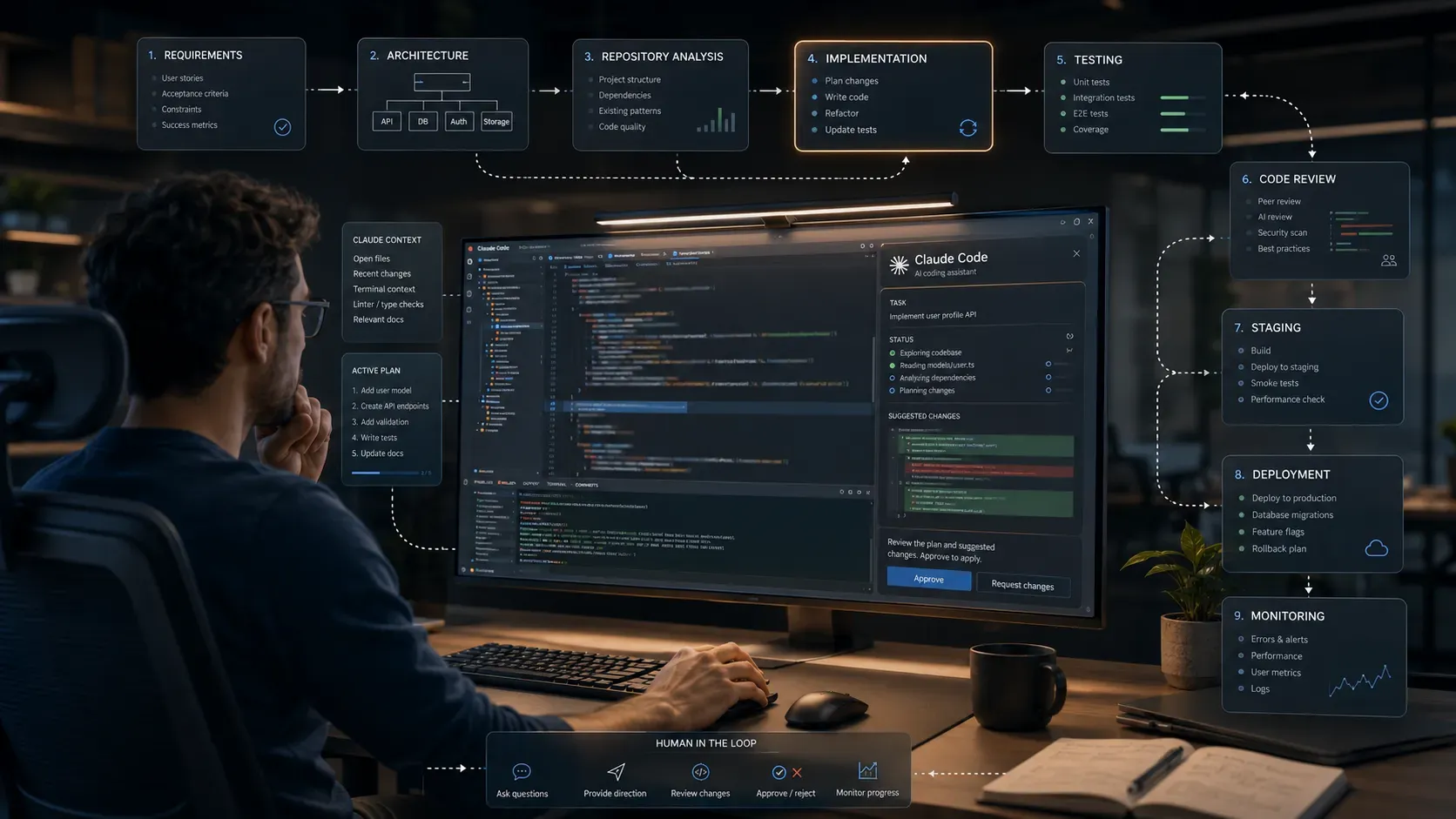
The workflow recommended here in one picture
The most useful mental model is:
Idea → requirements → architecture → repository → plan → implementation → test → review → fix → regression test → staging → production → monitor → maintain

This sequence is the publication’s recommended engineering workflow based on the documentation, testing-readiness plan, and engineering best practice — not an official Anthropic mandate.
Claude Code can participate in many stages when the necessary tools and permissions are available.
It should not own every stage.
The developer remains responsible for defining what the software is supposed to do, choosing critical technical and product tradeoffs, controlling permissions, reviewing changes and determining whether the final system is actually acceptable.
That is what separates AI-assisted development from pressing a button on a website generator.
The real advantage is the development loop
The most important change in 2026 is not that Claude Code can write more HTML, CSS or JavaScript.
It is that Claude Code can operate across a software project through the environment and permissions provided to it: inspecting repository files, making changes, executing development commands and participating in testing and debugging loops. (Claude Code overview; How Claude Code works; Common workflows).
That makes Claude Code more useful as a development partner than as a magical website generator.
But the same capability creates a responsibility.
The more of the software lifecycle an AI agent can touch, the more important it becomes to define boundaries, preserve version history, test the relevant behaviors and maintain human control over consequential decisions.
The proper way to build a full site with Claude, therefore, is not to ask ordinary Claude chat to build everything.
It is to use Claude Code inside a real engineering environment with a clearly defined problem, appropriate permissions and measurable acceptance criteria — and then require the resulting software to meet the same standard every software system ultimately needs:
working, appropriately tested and reviewable code.








Log in to comment or comment as a guest.